

Plain JavaScript is fast to write, but it has a habit of betraying you at the worst possible moment. Runtime errors surface in production, a teammate renames a function and forgets to update three call sites, and suddenly your client-facing app is broken. TypeScript reduces runtime errors by up to 70%, especially in large-scale applications where the cost of a bug is highest. This guide covers what TypeScript is, how it works under the hood, why it matters for teams building scalable software, and the best practices that separate disciplined adoption from a messy migration.
Table of Contents
- What is TypeScript and how does it work?
- Why TypeScript matters for scalable applications
- Key language features: Static typing, generics, and more
- Advanced nuances, edge cases, and best practices
- What most articles don't tell you about TypeScript adoption
- Ready to scale with TypeScript?
- Frequently asked questions
Key Takeaways
| Point | Details |
|---|---|
| TypeScript enhances scalability | TypeScript’s static typing and advanced features reduce bugs and make large codebases more maintainable for teams. |
| Adoption is growing | Over 78% of developers report using TypeScript, with strong salary and career advantages for practitioners. |
| Strict configuration matters | Enforcing strict mode and avoiding 'any' is key to unlocking TypeScript’s real-world benefits. |
| Migration is flexible | Projects can transition from JavaScript to TypeScript incrementally, lowering adoption risk for scaling companies. |
What is TypeScript and how does it work?
TypeScript is not a separate language you have to learn from scratch. It is a typed superset of JavaScript that compiles to plain JavaScript, adding static types, interfaces, enums, and generics on top of the syntax you already know. Every valid JavaScript file is also a valid TypeScript file. That single fact makes adoption far less painful than most developers expect.
The compilation step is where the magic happens. When you run the TypeScript compiler (tsc), it checks your code for type errors and then strips all type annotations out, producing clean JavaScript that any browser or Node.js runtime can execute. This process is called type erasure, and it means TypeScript has zero runtime overhead. The types exist purely to help you and your team write better code.
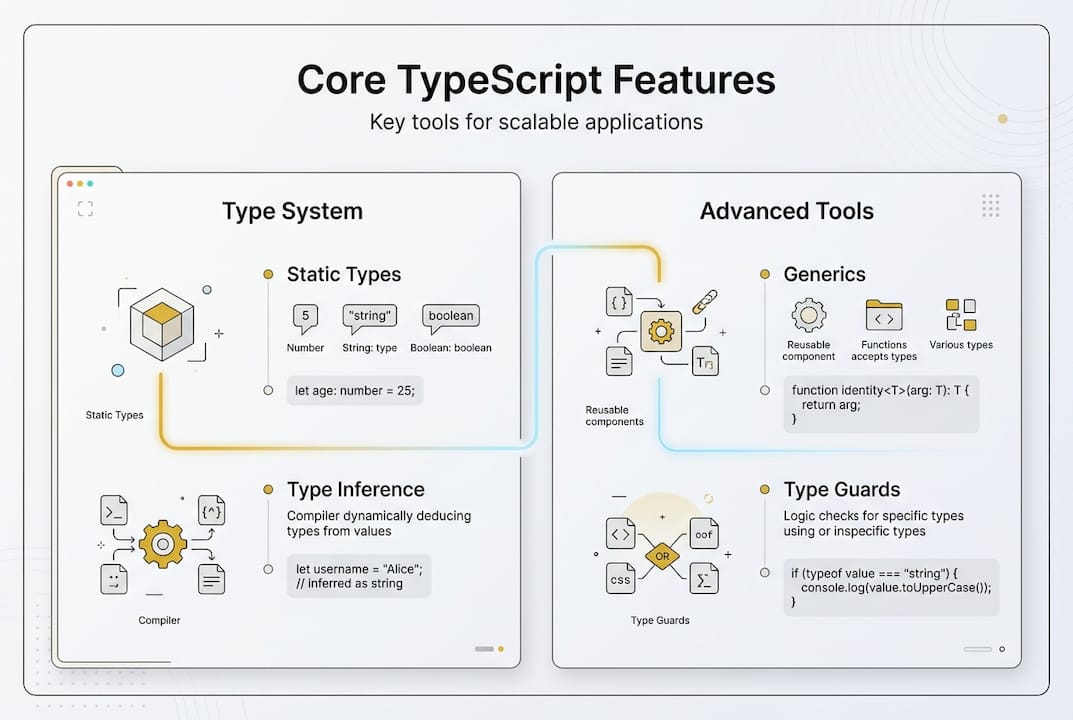
Here is a quick look at the core language features TypeScript adds:
- Static types: Declare the shape of your data explicitly so the compiler catches mismatches before they reach users.
- Interfaces: Define contracts for objects and classes, making APIs self-documenting.
- Enums: Replace magic strings and numbers with readable, refactor-safe constants.
- Generics: Write reusable functions and data structures that stay type-safe across different data types.
- Type inference: TypeScript figures out types automatically in many cases, so you write less boilerplate.
The TypeScript docs describe core mechanics that include structural typing, union types, type guards, and conditional types. Structural typing means TypeScript checks the shape of an object, not its declared class, which aligns naturally with how JavaScript developers already think.
| Feature | What it does | Practical benefit |
|---|---|---|
| Static types | Annotate variables and function signatures | Catch bugs at compile time |
| Generics | Parameterize types | Reuse logic without losing safety |
| Enums | Named constant sets | Cleaner domain logic |
| Interfaces | Object shape contracts | Self-documenting APIs |
| Type guards | Runtime type narrowing | Safer conditional logic |
IDE support is one of TypeScript's most underrated advantages. Editors like VS Code use TypeScript's language server to provide accurate autocomplete, inline error highlighting, and safe rename refactoring across your entire codebase. That feedback loop alone saves hours every week on a growing project.
Why TypeScript matters for scalable applications
Understanding what TypeScript adds, let's look at why it's become essential for teams scaling modern software.
Maintainability is where JavaScript starts to crack under pressure. When a codebase grows past a few thousand lines, implicit assumptions about data shapes pile up. A function that once accepted a user object now receives a slightly different shape from a new API endpoint, and nothing warns you until a user hits an error. TypeScript makes those assumptions explicit and enforces them automatically.

The numbers back this up. TypeScript reduces runtime errors by up to 70% and delivers measurably better refactoring, documentation, and team collaboration compared to plain JavaScript in large applications. That is not a marginal improvement. It is the difference between a team that ships confidently and one that spends Friday afternoons chasing production bugs.
Adoption is accelerating fast. TypeScript is used by 40% of developers exclusively, and large-scale adoption is up 66% year over year according to the State of JS Survey 2025. If you are evaluating whether to invest in TypeScript for your startup, the ecosystem momentum alone is a strong signal.
Here is how TypeScript and JavaScript compare on the dimensions that matter most for client-facing apps:
| Dimension | JavaScript | TypeScript |
|---|---|---|
| Bug detection | Runtime | Compile time |
| Refactoring safety | Manual, error-prone | Automated, reliable |
| Onboarding speed | Slower (implicit contracts) | Faster (explicit types) |
| IDE support | Basic | Rich autocomplete and hints |
| Long-term maintainability | Degrades with scale | Scales well |
For enterprise and startup teams alike, the collaboration benefit is just as important as the technical one. When a new developer joins, TypeScript types act as living documentation. They do not need to read through every function to understand what it expects. The types tell the story.
"TypeScript's type system is not just about catching errors. It is about making your codebase legible to every developer who touches it, today and two years from now."
The tooling advantages compound over time. Safe rename refactoring, go-to-definition across modules, and automatic import suggestions all work more reliably with TypeScript. For teams doing continuous iteration on client-facing products, that speed adds up.
Key language features: Static typing, generics, and more
Knowing the high-level advantages, let's unpack which specific language features power TypeScript's effectiveness.
Static typing is the foundation. When you annotate a function parameter as "string`, TypeScript will not let you pass a number without an explicit conversion. This sounds simple, but it eliminates an entire category of bugs that are notoriously hard to reproduce and debug. Core mechanics include static typing, type inference, unions, and strictNullChecks, all of which work together to make your code predictable.
Type inference reduces the annotation burden significantly. TypeScript can figure out that const count = 0 is a number without you writing const count: number = 0. You get the safety without the verbosity, which keeps code readable.
Generics are where TypeScript gets genuinely powerful for reusable code. Instead of writing separate functions for arrays of strings and arrays of numbers, you write one generic function that works for both while staying fully type-safe. This is especially useful in API layers and data-fetching utilities that client-facing apps rely on heavily.
Union types let you express that a value can be one of several specific types. For example, a status field might be 'loading' | 'success' | 'error'. TypeScript enforces that you handle all three cases, which prevents the silent failures that plague JavaScript apps.
Here are the features worth prioritizing when your team starts adopting TypeScript:
- strictNullChecks: Forces you to handle
nullandundefinedexplicitly, eliminating the most common runtime crash in JavaScript. - Type guards: Narrow types at runtime with
typeoforinstanceofchecks, keeping conditional logic safe. - Enums: Replace strings like
'ADMIN'or'USER'with a properRoleenum that is refactor-safe and self-documenting. - Mapped types: Transform existing types programmatically, useful for building consistent API response shapes.
Pro Tip: Enable best practices for TypeScript from day one by setting strict: true in your tsconfig.json. It is much easier to start strict than to tighten up a lax codebase later.
Structural typing also deserves attention. TypeScript checks whether an object has the right shape, not whether it was created with a specific class. This aligns with JavaScript's duck-typing culture while adding compile-time safety, making it feel natural rather than restrictive.
Advanced nuances, edge cases, and best practices
After learning core features, consider real-world challenges TypeScript teams face and how to address them.
Strict mode is non-negotiable for production teams. The flags strictNullChecks and noImplicitAny catch the bugs that cost the most time to debug. Edge cases include strict mode flags, performance limits, and overuse of 'any', and skipping strict mode is the single most common mistake teams make during migration.
Here is a practical order for enabling strict flags in an existing project:
- Enable
noImplicitAnyfirst. This forces explicit types on all untyped variables and surfaces the biggest ambiguities. - Add
strictNullChecksnext. Handlenullandundefinedexplicitly throughout the codebase. - Turn on
strict: trueto activate all remaining strict checks at once. - Use
unknowninstead ofanywhen you genuinely do not know a type. It forces you to narrow the type before using it. - Run
tsc --extendedDiagnosticsto profile build times and identify slow type-checking hotspots.
"Reaching for 'any' is the TypeScript equivalent of commenting out a failing test. It feels like a fix but it is actually a deferred problem."
Adoption can be gradual because TypeScript is a superset of JavaScript. You can rename one file from .js to .ts, fix the errors it surfaces, and merge that as a standalone pull request. Small, focused PRs beat a single massive rewrite every time. Teams that try to migrate everything at once almost always stall.
Pro Tip: Use advanced TypeScript patterns like discriminated unions for your API response types. They make exhaustive error handling natural and eliminate entire classes of bugs in data-fetching code.
Build performance is worth monitoring as your codebase grows. Microsoft's new Go-native TypeScript compiler delivers significant build speed improvements, which matters for teams with large monorepos or complex type hierarchies. Keeping types lean and avoiding deeply nested conditional types also keeps compile times fast.
What most articles don't tell you about TypeScript adoption
Most TypeScript guides tell you to add types and move on. That advice misses the point entirely.
The real value of TypeScript is not the syntax. It is the discipline it enforces across a team. Strict mode and type discipline are essential for scalable apps, not just for catching errors in isolation. When everyone on your team writes typed code with strict flags enabled, the codebase becomes self-correcting. New features do not silently break old ones.
The teams that struggle with TypeScript are almost always the ones that treated it as a checkbox. They migrated files, kept any everywhere, and never enabled strict mode. The result is a codebase that has TypeScript's complexity without its benefits.
Winning buy-in from skeptical teammates is easier when you show concrete ROI. Track the number of runtime errors in your error monitoring tool before and after migration. Show the reduction. That data is far more persuasive than any argument about syntax.
Gradual migration with tiny PRs is not just a technical strategy. It is a political one. Each small PR proves that TypeScript makes the codebase better without breaking anything. That builds trust, and trust is what sustains a multi-month migration.
Ready to scale with TypeScript?
If you have read this far, you already know that TypeScript is not just a trend. It is a structural investment in your application's long-term health. The question is whether you have the right team to implement it well.

At KIQA.DEV, we specialize in building scalable, production-ready applications using TypeScript, Next.js, React Native, and Supabase. Whether you need a full TypeScript migration for an existing JavaScript codebase or want to start a new client-facing product on solid architectural foundations, our dev hub is a great place to explore how we work and what we build. Let's ship something that scales.
Frequently asked questions
Is TypeScript better than JavaScript for all projects?
JavaScript fits rapid prototyping and simple scripts well, while TypeScript excels in large, client-facing, or team-based applications where maintainability and scalability matter most.
Can I migrate an existing JavaScript project to TypeScript?
Yes. TypeScript is a superset of JavaScript, so any valid JavaScript file is also valid TypeScript, enabling a file-by-file migration at whatever pace fits your team.
Does using TypeScript slow down application runtime?
No. TS types are erased at compile time, so the JavaScript output is identical in runtime performance to code written in plain JavaScript.
What are common pitfalls in TypeScript for new teams?
Poor type boundaries and configuration are the biggest pitfalls. Overusing 'any', skipping strict mode, and attempting a full codebase rewrite at once all undermine the benefits TypeScript is supposed to deliver.